跳转到主要内容
上下文菜单可快速访问经 AI 优化的内容,以及与主流 AI 工具的直接集成。用户在任意页面打开上下文菜单时,可以将内容复制为 AI 工具的 context,或在 ChatGPT、Claude、Perplexity,或你自定义的工具中直接开启对话,并自动加载你的文档作为 context。 上下文菜单包含多个内置选项,你可以通过将其标识符添加到配置中来启用。
选项标识符说明
复制页面copy将当前页面复制为 Markdown,便于作为上下文粘贴到 AI 工具中
以 Markdown 查看view以 Markdown 打开当前页面
在 ChatGPT 中打开chatgpt使用当前页面作为上下文创建一个 ChatGPT 会话
在 Claude 中打开claude使用当前页面作为上下文创建一个 Claude 会话
在 Perplexity 中打开perplexity使用当前页面作为上下文创建一个 Perplexity 会话
在 Grok 中打开grok使用当前页面作为上下文创建一个 Grok 会话
复制 MCP 服务器 URLmcp将你的 MCP 服务器 URL 复制到剪贴板
复制 MCP 安装命令add-mcp复制用于安装 MCP 服务器的 npx add-mcp 命令
连接到 Cursorcursor在 Cursor 中安装你托管的 MCP 服务器
连接到 VS Codevscode在 VS Code 中安装你托管的 MCP 服务器
自定义选项Object向上下文菜单添加自定义选项
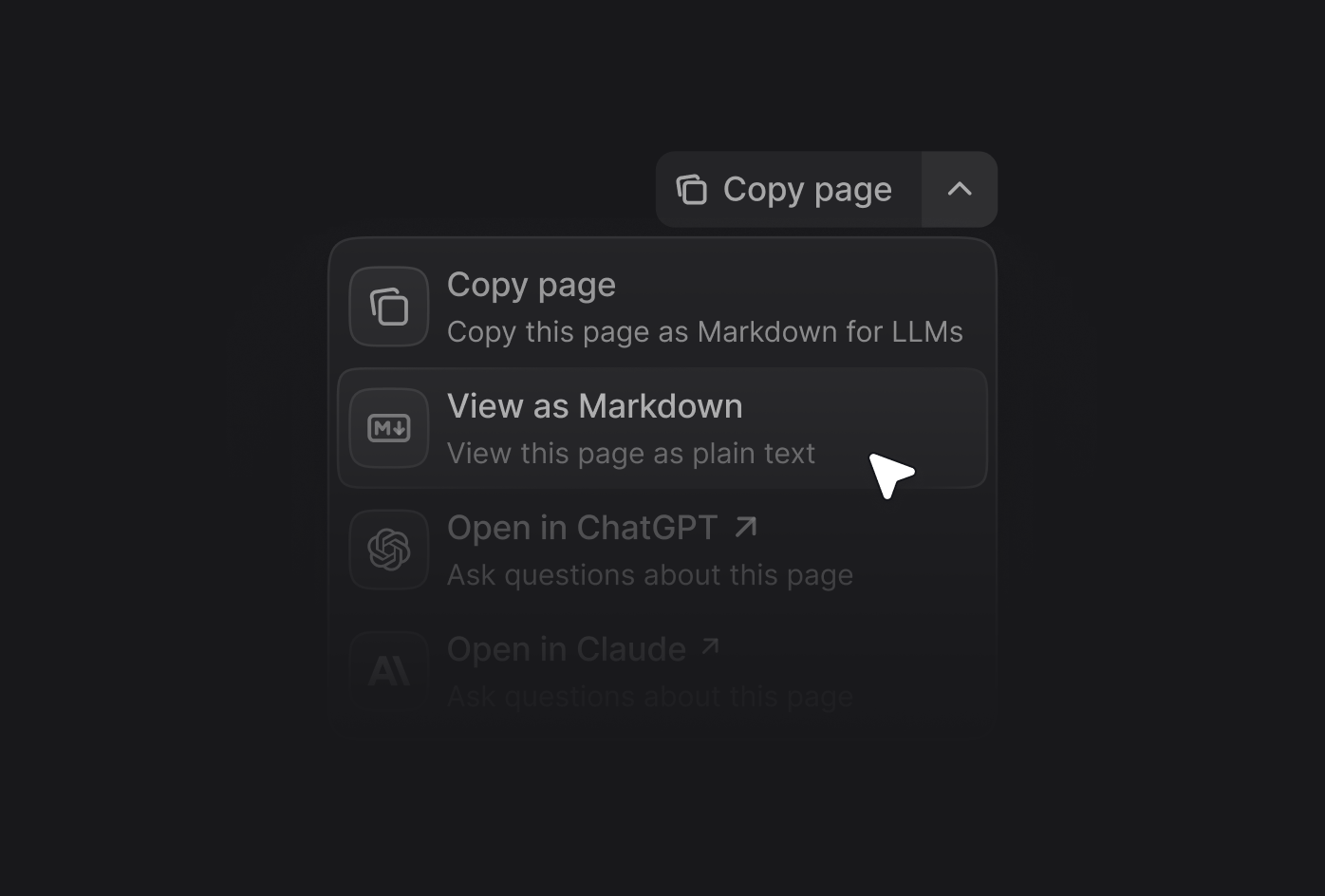
展开的上下文菜单,显示了复制页面、以 Markdown 查看、在 ChatGPT 中打开以及在 Claude 中打开等菜单项。

启用情境菜单

在你的 docs.json 文件中添加 contextual 字段,并指定要包含的选项。
{
 "contextual": {
   "options": [
     "copy",
     "view",
     "chatgpt",
     "claude",
     "perplexity",
     "grok",
     "mcp",
     "cursor",
     "vscode"
   ]
 }
}

添加自定义选项

通过向 options 数组添加一个对象,在上下文菜单中创建自定义选项。每个自定义选项需要包含以下属性:
title
string
必填
选项的标题。
description
string
必填
选项的说明。在展开上下文菜单时显示于标题下方。
icon
string
必填
要显示的图标。可选值:
  • 如果在 docs.json 中将 icons.library 属性 设置为 fontawesome,则为 Font Awesome 图标 的名称
  • 如果在 docs.json 中将 icons.library 属性 设置为 lucide,则为 Lucide 图标 的名称
  • 如果在 docs.json 中将 icons.library 属性 设置为 tabler,则为 Tabler 图标 的名称
  • 指向外部托管图标的 URL
  • 项目中图标文件的路径
iconType
string
Font Awesome 的图标样式。仅在使用 Font Awesome 图标时有效。可选值:regularsolidlightthinsharp-solidduotonebrands
href
string | object
必填
选项的 href。简单链接使用字符串,带有 query 参数的动态链接使用对象。
自定义选项示例:
{
    "contextual": {
        "options": [
            "copy",
            "view",
            "chatgpt",
            "claude",
            "perplexity",
            {
                "title": "功能请求",
                "description": "在 GitHub 上参与讨论,请求新功能",
                "icon": "plus",
                "href": "https://github.com/orgs/mintlify/discussions/categories/feature-requests"
            }
        ]
    }
}

自定义选项示例

{
  "title": "请求新功能",
  "description": "在 GitHub 上参与讨论",
  "icon": "plus",
  "href": "https://github.com/orgs/mintlify/discussions/categories/feature-requests"
}
{
  "title": "在 X 上分享",
  "description": "将此页面分享至 X",
  "icon": "x",
  "href": {
    "base": "https://x.com/intent/tweet",
    "query": [
      {
      "key": "text",
      "value": "查看这份文档:$page"
      }
    ]
  }
}